WCF Alternatives (Part 4) – Summary

In the last blog post of the series on alternatives for the Windows Communication Foundation (WCF), we are going to recapitulate and compare them once again. 

Decision matrix 

CharacteristicWeb APIgRPC
Bidirectional communication Possible with restrictions 
Has to be realized with SignalR. 
Possible with restrictions 
Only stream response is supported. 
Scope of changes to existing codeSmall 
Due to the adoption of the service methods into the controllers and the generation of the client, few adjustments are required. 
Large 
Mapping is required because specific data types are prescribed in some instances: An input parameter and a return value are required.
Necessary prior knowledge Technology-specific 
Web API knowledge about the use of controllers and actions, HTTP verbs 
Technology-specific 
Particularities of gRPC, creation of the *.proto file 
Platform independence Yes 
When you use .NET Core, client and server can run on different platforms. 
Yes 
When you use .NET Core, client and server can run on different platforms. 
InteroperabilityYes 
Client and server can be created using different programming languages. 
Yes 
Client and server can be created using different programming languages. 
Browser support YesOptional 
Currently possible only with third-party libraries 
Self-describing interfaces Optional 
OpenAPI is possible by integrating third-party libraries. 
No 
You have to create the *.proto file for the description of the interface yourself. 
Payload sizeHigher 
JSON, human-readable 
Lower 
Binary format 
SpeedLowerHigher
SustainabilityYes 
Microsoft currently recommends Web API as a sustainable alternative. 
Yes 
Microsoft currently recommends gRPC as a sustainable alternative. 
DebuggingEasily possible Possible with restrictions 
The transferred data cannot be examined due to the compression. 

Advantages and disadvantages 

Web API

gRPC

Advantages

  • Transmission data are readable 
  • Fewer code adjustments required for the migration 
  • More flexible design of the endpoints and calls with respect to input parameters and return values 
  • Faster transmission 
  • Typed by means of Protocol Buffers interface description 
  • Simple generation of client classes 

Disadvantages

  • Slower transmission compared to gRPC 
  • Generation of client classes only by means of third-party libraries 
  • Typing of the interface not possible 
  • Transmission data not readable 
  • Mapping code required because no standard .NET types are used 
  • Greater effort involved in the migration due to more necessary code adjustments 

Conclusion

In our blog post series on WCF, we have presented both ASP.NET Core Web API and gRPC. We have seen that both options have advantages and disadvantages. 

With Web API, the interfaces can easily be used by anybody due to the content-first approach and the use of HTTP. The transmitted data are accessible and can be read at any time. 

gRPC abstracts the interface calls using the contract-first approach, making them faster and very easy to address by developers. However, the transmitted data cannot be accessed. 

In principle, migration to both options is possible, and both are recommended by Microsoft. Still, we cannot definitively recommend one of the alternatives. The decision should always be project-specific and based on various criteria such as the project scope, experience with the respective technology or the existing architecture. 
Christmas party in times of Corona: The 2nd ZEISS Digital Innovation Online Campus Event

As early as spring we at ZEISS Digital Innovation (ZDI) started to plan our Christmas party which normally takes place on the Friday before the 1st Sunday of Advent. In 2020 we quickly came to realize that a traditional Christmas party where all the employees normally meet in Dresden and celebrate together would unfortunately not be possible this time. Cancelling the Christmas party was not an option for us either, so we started to search for a new format.

We came back to the idea of our 1st ZDI online campus event which had already received a lot of positive feedback. It was especially important to us this time that we created an all-encompassing festive mood, in addition to the intern knowledge sharing. But how could we bring this home to our colleagues?

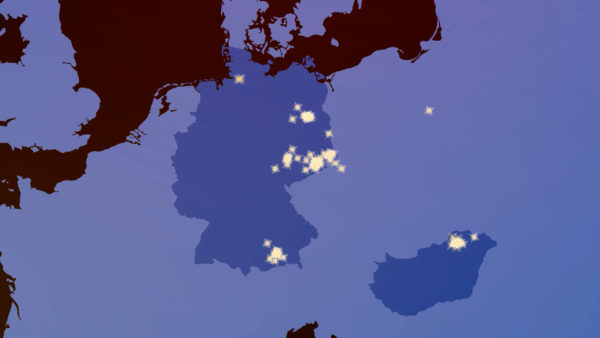
A map showing all the locations from which our employees were connected.
Figure 1: Our colleagues participated in the online campus event from a wide variety of locations.

A small Christmas surprise for all employees

To enhance a Christmas atmosphere all employees received a small Christmas parcel by mail with the request that it should only be opened on the day of our common online campus event.

All 345 parcels were personally packed by the organizational team to a background of festive Christmas music. We were happy that the Christmas surprise arrived in time at the homes of all our colleagues in Germany and Hungary.

So all were on time for our 2nd ZDI online campus event with Christmas goodies, mulled wine and traditional Christmas spices to create a delicious punch, an Advent calendar, a Christmas party hat and other small gifts and off we go!

2nd online campus event including online team game and Christmas celebration

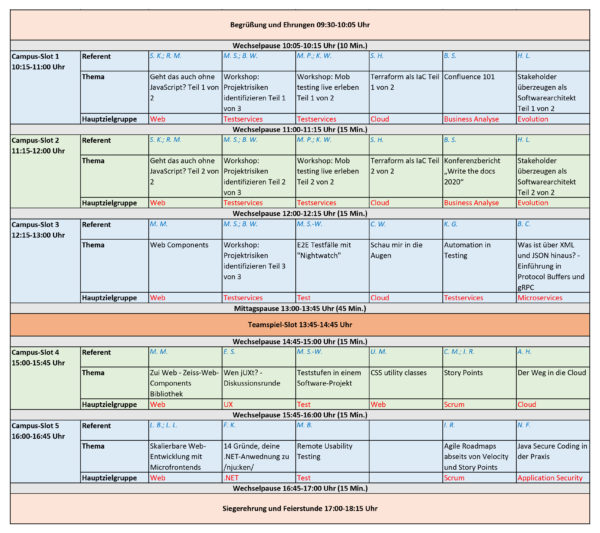
Using the positive experiences from our 1st ZDI online campus event this time again we offered different lecture slots from and for our colleagues during the whole day. The technical realization was done again via Microsoft Teams. We had 29 lectures altogether covering a variety of different topics such as Java, .NET, Cloud, Usability, Agile and Web. Through lessons learned the first time around we adapted the length of the lecture slots increasing them to 45 minutes instead of 30 with 15-minute breaks in between to change. So everyone had time to breathe and mentally prepare for the next one.

Timetable of all presentations at our 2nd ZEISS Digital Innovation online campus event.
Figure 2: A total of 29 presentations in 6 parallel slots were given on related topics.

After a longer lunch break our online team game took place, 28 teams took part, consisting of nine to ten players in each one. When we put together the teams we paid great attention to the make-up of each team ensuring that they were as heterogeneous as possible regarding the level of maturity, location and business area. Each group had their own team room for solving the tasks, it was a super way to get to know each other. The activities included among other things general knowledge questions, charades and quizzes as well as practicing the Christmas team contribution, which every team presented live at the end of our online campus event within the framework of our collective Christmas party.

We kicked off our Christmas Celebration together by drinking a toast! After that each team started to show their live Christmas contributions. There were musical and poetic presentations and performances including Christmas greetings in different languages together with Christmas film tips and recommendations. All teams were extremely creative and the team chat was also available and used actively adding another dimension to our party. So despite the wide distribution and accompanying physical distance, there was nevertheless a contemplative Christmas mood that was felt by all.  

Conclusion

We all knew that an online format and a virtual Christmas celebration could never replace the feeling of a real on-site Christmas party with ice skating, delicious food, dancing and the relaxed atmosphere amongst one other. Still, we were pleasantly surprised how much festive, community spirit could nonetheless be felt online. It has shown us once more that we are a strong team acting in unison and despite Corona we are ready to make the best of the current situation breaking new ground together.

It is uncertain if we may celebrate a summer or Christmas party with all the colleagues in Dresden on-site this year. But one thing is already for sure: our new online campus event format with team games is certain to outlast Corona.

Knowledge Transfer & Team Building During the Coronavirus Pandemic: The ZEISS Digital Innovation Online Campus Event

Once a year, ZEISS Digital Innovation (ZDI) invites employees from all ZDI locations to a summer festival with a two-day in-house training seminar at our headquarters in Dresden.

During these two days, interesting presentations and workshops in various technical subject fields are provided by and for the employees. The program is framed by an agile team game where mixed teams compete against each other in various disciplines ranging from quizzes to games of skill and sports activities. The variety allows each team member to contribute their individual skills. At the end of the first day, everyone can then take time to talk and get to know each other better in a leisurely atmosphere with tasty street food and refreshments.

The challenges of realizing the campus event under difficult circumstances

But then the coronavirus struck—now what? Should we cancel this year’s campus event and the team game? Would there be a way for us to bring all our colleagues together despite the virus, to enable the knowledge transfer and further strengthen team spirit? We needed a new format that would allow us to realize such an event despite the physical distance and predominantly mobile work.

That is why we decided to plan our first joint online campus event as a half-day event. In addition to the formal organization and the content of the online campus event and the online team game, a number of technical aspects had to be taken into account: How could we avoid annoying disturbances and delays in the transmission during the presentations? Did all of our colleagues have sufficient bandwidth, even if they were not working at one of our locations?

Then we had to consider the ideal length of the presentations and breaks, the best way to clearly present information, the size of the teams, and the design of a diversified online team game.

Plus: Which tool was both sufficiently reliable and capable of meeting all the technical and organizational requirements? What about compatibility with other tools used by our colleagues in their presentations? In the end, we decided to use Microsoft Teams and Microsoft Teams Live Events. All of us were already familiar with the tool, and it was sufficiently reliable to meet our requirements.

Online training seminars by and for colleagues

As usual, each of our colleagues had the opportunity to submit topics to present as speakers for the online campus event. Even though some of them were under a strain in their private life that was higher than normal, e.g. due to homeschooling, many used this opportunity to submit their own topic. As a result, our online campus event comprised 32 exciting presentations in the competence fields of cloud computing, web, QA, Java, agile/scrum, business analysis, usability, and application security. For example, one presentation gave insight into the functions of AWS Athena, and another gave advice on the realization of micro-frontends.

Each slot was 30 minutes long, and the presentations took place in eight parallel virtual rooms. The listeners could use the breaks to collect and prepare themselves for the next topic and, if necessary, switch to another session. Furthermore, this allowed the speakers to start their respective presentations comfortably and without problems, either at the office or from home.

Even though we are used to working in distributed locations every day, a distributed online campus event is an altogether different experience. As scrum masters and coaches, we always try to make our contributions as interactive as possible. By means of whiteboards, which enabled the attendees to actively participate, we were able to somewhat blur the lines between the remote workplaces. I think it is important that at least some participants switch on their camera, so that the speaker does not speak to an ‘empty room’.

Ines Reiche, Speaker at the online campus event, Scrum Master, ZEISS Digital Innovation

Distributed collaboration in the online team game

In addition to the transfer of technical knowledge, getting to know each other and having fun together was equally important, just like at the previous campus events: The team game has long been an important element of our campus event, and because of the unique situation this year, the participants were particularly excited and curious.

Each team was given a separate virtual team room where they were able to interact, without interference, to solve the respective tasks. As usual, the teams were assembled to be as heterogeneous as possible, e.g. with respect to their roles, level of seniority, and location. Thus, colleagues who rarely meet in their daily work were able to get to know each other and work together. The tasks were designed to be as entertaining and diverse as possible. At the same time, it was important to make sure the tasks could not be solved with a simple web search.

Conclusion & outlook

We are happy to report that a total of 248 colleagues participated in our online campus event, and that 19 teams competed in the online team game. Our first online campus event was an exciting new experience for all of us. Despite the different format and the mobile distribution, the anticipation, enthusiasm and commitment of all the participants were palpable. Furthermore, we were able to identify some potential for improvement that we will take into account next time.

Our new format proved that irrespective of the distributed collaboration and limited personal contact at the time, we are still ONE strong team exploring new paths together. We will use these unusual times to continue to develop our new format, and we are looking forward to the next event.

Sales Without Coffee—Impossible!?

When you switch to the sales department, you quickly realize: Your consumption of coffee is going to increase. Because if the client asks you whether you would like some coffee—would you want to start off a personal meeting with a “No”?

Coffee is usually part of the small talk that creates a positive basis for the first encounter at the beginning of most sales meetings. As you talk about coffee—the type, the method of preparation, etc.—and walk towards the coffee table, you get to know each other and start building a relationship. This is a basis that you learn to appreciate.

Tasse Kaffee und Brille im Büro-Arbeitsumfeld

Or it was, until Coronavirus! Not only did the cancellation of flights make reaching the clients more difficult, but the whole situation also left us at a loss at first: How were we supposed to identify new issues with existing or new clients? How were we supposed to convince the client to choose us, in light of smaller budgets and reprioritization, without being on site? How were we supposed to build the necessary trust without ever having sat down together?

For the service sector in particular, these obstacles seemed to be insurmountable at first—but fortunately, that changed quickly. Just like the other divisions of ZEISS Digital Innovation, here i sales and in the field of positioning, we examined the tools used by our development teams, who have been practicing distributed software development for years. And we used them for inspiration.

The comparison of all the sales colleagues held every two weeks has always been done on a distributed basis and supported by our CRM (SalesForce) anyway. In addition, our new customer sales department and the marketing team also switched to a daily mode. For example, we shortened our sales sprint from four months to four weeks, i.e. the marketing team synchronizes with new customer sales along the campaigns every morning at 9:30 a.m., and they discuss events, items on their to-do lists, and challenges. Every four weeks, we do a retrospective, a review and planning, concluding and reflecting upon the past four weeks and planning the following weeks. The new four-week cycle was necessary because at the end of March 2020, nobody was able to foresee which issues would need to be prioritized in June, but that would have been a necessary prerequisite to continue the four-month cycle we used before the pandemic.

In order to be able to do the new, distributed dailies from home too, we used Skype for Business and Microsoft Planner at first. Later, we switched to MS Teams, using the associated MS Whiteboard for content-related work as required. 

Now we have a tool set that has also proven to be very beneficial in the interaction with our clients over the past weeks. MS Teams has become customary in virtually every organization, and everybody is much more willing to use conferencing tools, allowing us to take this path quickly and straightforwardly. An aspect that we find to be particularly favorable is the willingness to turn on the video stream in a meeting instead of only using audio. You could say that the video stream between the parties involved is a substitute for having coffee together: it gives both parties a better sense of each other and reduces issues of interpretation that often occur in phone conferences. With new clients or new contacts in particular, this is a true blessing for any future collaboration.

We also needed to adapt our rituals in the preliminary project stages. For example, we could no longer do a two-day project vision workshop with the client on site. Alternatively, we now do 4 x 0.5 days, each with 2 x 2 h sessions in MS Teams, immediately documented by means of a Microsoft Whiteboard, where they are visible for and editable by everyone. This way, we have been able to start several projects during the Corona crisis—even with new clients who have never worked with us before.  

This is an entirely new scenario that is still somewhat surreal and strange for us here in sales, and that will likely permanently change the sales process. In the end, we are having coffee together again—everyone in their own workspace, connected by MS Teams, Skype and the like.