Industrial Data Platforms on Microsoft Azure: a decision guide for manufacturing – Part 1: From use case to Azure stack

From concept to implementation

In the previous articles, we discussed architecture concepts for industrial data platforms: brownfield challenges, latency classes, batch versus streaming, the Medallion Architecture, and the question of edge versus cloud. But all these concepts remain abstract until they lead to concrete technology decisions.

This article is a guide to finding the right technology foundation for your manufacturing environment. How do we translate architecture ideas into sensible decisions on Microsoft Azure from the perspective of OT, IT, and data teams? Using Azure, these questions often lead to two main directions today: either Platform as a Service (PaaS) with a stack made up of Azure building blocks, or a more integrated Software as a Service (SaaS) solution with Microsoft Fabric. Neither direction is inherently superior; what matters are the use case, the operating model, and the skills that already exist. At ZEISS Digital Innovation, we support manufacturing companies in exactly this transformation. This article is intentionally not a product catalog, but a decision guide based on our experience from real projects. We start from the specific use case, ask the right questions, and show which direction the answers point to on Azure. One thing becomes clear: managed services remove much of the infrastructure work, but domain architecture and governance remain project-specific tasks.

One important point must be considered from the start: the cost structure in day-to-day operation. Wrong architecture decisions, such as streaming instead of batch, missing storage lifecycle policies, or unnecessary data redundancy, quickly lead to unexpectedly high cloud costs. From our project experience, we know this: economically sound architectures emerge when cost is considered from the beginning and weighed carefully in the context of the operating model.

A brief recap: the basic principles

Modern manufacturing companies struggle with hundreds to thousands of data sources in silos. An industrial data platform creates a central infrastructure to collect, process, and use this data. We have learned that not every use case needs real-time data. The range goes from milliseconds for process control to days for management reports. True closed loops in the millisecond range remain in the automation layer or at the edge; the central data platform mainly supports monitoring, analysis, and coordination. The right classification saves cost and complexity.

The Medallion Architecture structures the data flow: Bronze for raw data, Silver for cleaned data, Gold for aggregated business views. And depending on latency requirements and network conditions, we decide whether batch ingestion is sufficient or streaming is necessary, and whether we preprocess data within edge or send it directly to the cloud. With this basic understanding, we can now get specific: How do these principles translate into actual technology? In the Microsoft ecosystem, this means a focused selection of suitable services.

From use cases to technology decisions

But let us not start with technology. Let us start with typical manufacturing use cases. The following three scenarios should be understood as stages of expansion with increasing complexity: from simple reporting to ongoing monitoring to machine learning (ML). In practice, an industrial data platform often grows in exactly this sequence. For each case, we first outline the solution approach and then derive suitable technology paths from it.
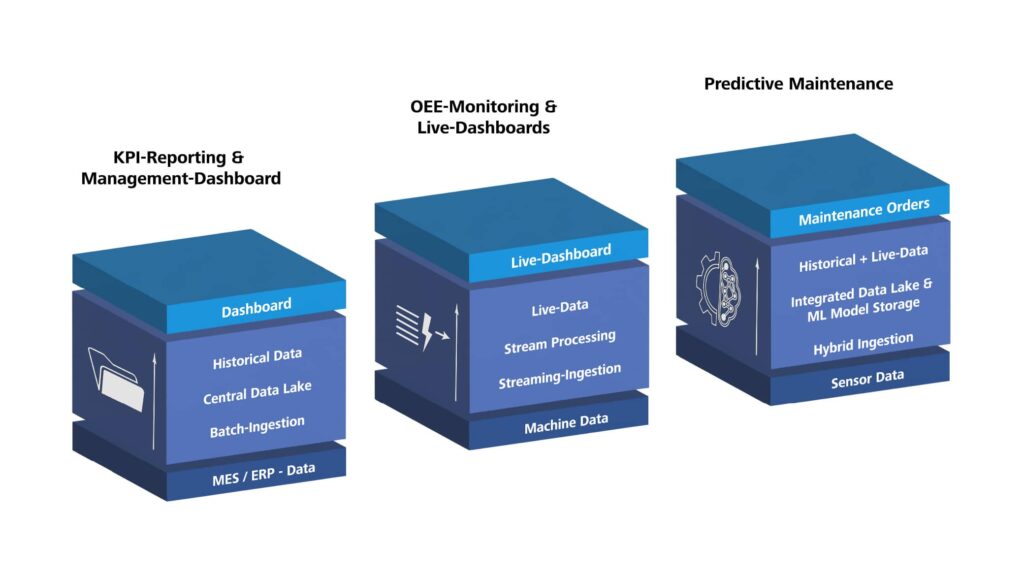
3D illustration of three stacked blue blocks showing typical industrial Azure data platform use cases: KPI reporting with batch ingestion from MES/ERP into a central data lake and dashboards; OEE monitoring with streaming ingestion, stream processing, live data and live dashboards from machine data; and predictive maintenance with hybrid ingestion of sensor data, historical plus live data in an integrated data lake with ML model storage, resulting in maintenance orders.
Figure 1: Data-driven use cases in manufacturing

Scenario 1: KPI Reporting and Management Dashboards

Let us first look at the classic case: manufacturing staff and managers want daily or weekly reports on production figures, scrap, and energy consumption. The data sources are manageable, network connectivity is stable, and an update every hour or every day is enough. Here, a clear batch approach is sufficient: data is loaded through batch ingestion, structured in Bronze, Silver, and Gold, and then provided for dashboards. The main effort lies less in the technology than in data modeling, KPI definition, and governance.

Scenario 2: OEE Monitoring and Live Dashboards

Now it becomes more demanding: staff in the control room need second- to minute-level views of machine condition and Overall Equipment Effectiveness (OEE) across several production lines. This is where streaming becomes relevant. Machine data is captured through streaming ingestion, processed almost in real time, and stored in parallel for historical analysis. In unstable networks or strict OT security zones, additional edge processing on the shop floor is recommended. Technically this is manageable, but organizationally it only succeeds when OT, IT, and the data team share responsibility for the end-to-end path.

Scenario 3: Predictive Maintenance

Predictive maintenance combines the best and the most demanding parts of both worlds. You need years of historical time-series data for model training and, at the same time, current streams for predictions that flow back into day-to-day operations, for example as maintenance orders in the Computerized Maintenance Management System (CMMS). The right approach is hybrid: streaming ingestion for current sensor data, historical time-series data in the Data Lakehouse, and a machine learning environment for training and inference. This is exactly where the difference between platform building blocks and project work becomes especially clear: Microsoft provides tools, but model selection, feature engineering, and integration into the CMMS remain project-specific.

Azure Building Blocks: not as a product list, but as a toolbox

Instead of going through an endless product list, let us look at Azure services by task area. This makes it easier to find the right technology for each challenge.

In principle, this leads to two well-supported paths: a PaaS approach, where you combine individual services for each task area, or a more integrated approach with Microsoft Fabric, where individual functions are more tightly connected. Neither path is automatically better. What matters are the desired level of integration, the operating model, and the question of how much platform composition your team wants to take on itself.

Connecting data sources and ingesting data

How does data from machines and sensors, as well as data from databases, files, or Application Programming Interfaces (APIs), get into the platform?

Table 1: Azure building blocks for connecting data sources and ingesting data

ServiceBest suited for?Typical classification
Azure IoT HubBidirectional communication with devices, device identities, and device lifecycleNear real-time
Azure Event HubsHighly scalable streaming for millions of events per second, no device identityNear real-time
Azure Event GridEvent-based architectures, MQTT support, Pub/SubNear real-time
Azure IoT EdgeContainerized logic on devices or gateways, local preprocessing, offline capabilityEdge processing
Azure IoT OperationsEdge data layer on Azure Arc/Kubernetes with MQTT broker, OPC UA connectivity, and streamingEdge processing
Azure Data FactoryConnection to databases, file and API sources, including from on-premises environmentsMainly batch
Partner solutions (e.g. OPC UA gateways)Protocol translation and machine connectivity in Brownfield environmentsDepends on the setup

For continuous data streams from machines and sensors, Azure IoT Hub, Azure Event Hubs, Azure Event Grid, and edge services are the obvious building blocks. Azure IoT Hub is suitable when you need device identities, secure communication, and device lifecycle management. Azure Event Hubs, in contrast, is designed for pure high-volume streaming without device management. Azure Event Grid is especially suitable for MQTT or event-driven architectures. For edge scenarios, there are currently two equally valid paths: Azure IoT Edge is a good fit for containerized logic on individual devices or gateways, while Azure IoT Operations is stronger when you want to build standardized industrial data flows with MQTT, OPC UA, and predefined cloud targets on Azure Arc/Kubernetes.

For batch ingestion from systems such as MES, ERP, SQL databases, file shares, SFTP, or APIs, Azure Data Factory is usually the more suitable building block. With its many connectors and a self-hosted integration runtime, on-premises sources can also be connected to the platform. This shows that data ingestion into the platform is broader than pure device communication. The right Azure solution depends on the source, the latency class, and the operating model.

Data storage and preparation

How do we store data in a structured way, version it, keep its history, and prepare it for analysis?

Table 2: Azure building blocks for data storage and preparation

ServiceBest suited for?Medallion role
Azure Data Lake Storage Gen2Scalable, cost-efficient object storage for structured and unstructured dataBronze, Silver, Gold
Apache Iceberg or Delta Lake (e.g. on Azure Databricks)ACID transactions, time travel, schema evolution on the Data LakeSilver, Gold
Microsoft Fabric (OneLake and Lakehouse)Integrated SaaS platform for storage, preparation, usage, and governanceBronze, Silver, Gold
Azure Data ExplorerHigh-performance analysis of telemetry, log, and time-series dataSilver, Gold
Azure SQL Database / Azure Cosmos DBRelational or NoSQL databases for specific use casesGold (for applications)

Azure Data Lake Storage (ADLS) Gen2 is the cost-efficient standard storage for all data. A table format such as Apache Iceberg or Delta Lake is added when you need ACID (Atomicity, Consistency, Isolation, Durability) transactions and historical tracking with schema evolution, which is typical for Silver and Gold. If you want to analyze large telemetry and time-series datasets interactively, Azure Data Explorer is often the more precise choice. Microsoft Fabric covers this layer in a more integrated way: OneLake as the shared storage foundation, Lakehouse for data preparation, and shared data use across several workloads. The Medallion model maps as follows: Bronze stores raw data unchanged, Silver cleans and harmonizes it in tables, Gold aggregates it for business views.

Orchestration and processing

How do we control, transform, and aggregate data flows, in batch or in streaming?

Table 3: Azure building blocks for orchestration and processing

ServiceBest suited for?Batch/Streaming
Azure Data FactoryOrchestration, ETL/ELT, many connectors, GUI-basedMainly batch
Azure DatabricksSpark-based, flexible for batch and streaming, ML workflowsBatch and Streaming
Azure Stream AnalyticsSQL-based streaming, simple for straightforward transformationsStreaming
Microsoft Fabric with Data Factory / Real-Time IntelligenceIntegrated orchestration, event streams, Eventhouse,
and real-time analytics
Batch and Streaming
Azure FunctionsServerless, event-driven, for small processing stepsBatch and Streaming

In the PaaS approach, Azure Data Factory is suitable for classic ETL jobs. Azure Databricks comes into play for complex transformations, large data volumes, and ML integration. Azure Stream Analytics is a good fit for simple streaming scenarios with SQL, while Azure Functions handle small, event-driven tasks. When using Microsoft Fabric, Data Factory and Real-Time Intelligence cover large parts of these tasks within one platform, from ingestion through event streams to analysis in Eventhouse or Power BI.

Usage and integration

How do we make data accessible to end users and applications?

Table 4: Azure building blocks for usage and integration

ServiceBest suited for?
Power BIBusiness intelligence, dashboards, reports, and data analysis in business units
Azure API ManagementProvide, secure, monitor, and version APIs
Azure Digital TwinsDigital twins for complex assets, room models, and process models
Azure App Service/ Azure Container AppsWeb apps, custom user interfaces, microservices

Power BI is often the standard choice for dashboards. With Microsoft Fabric, it is embedded directly in the platform. Azure API Management is suitable for providing data and ML models as APIs. Azure Digital Twins makes sense when you want to model assets, spaces, or process relationships semantically. Azure App Service or Azure Container Apps come into play when custom applications or microservices are needed.

Technology stack examples

To make the theory more concrete, let us look at three specific stack examples for the scenarios introduced above. Each example first shows the PaaS approach and then a possible alternative with Microsoft Fabric.
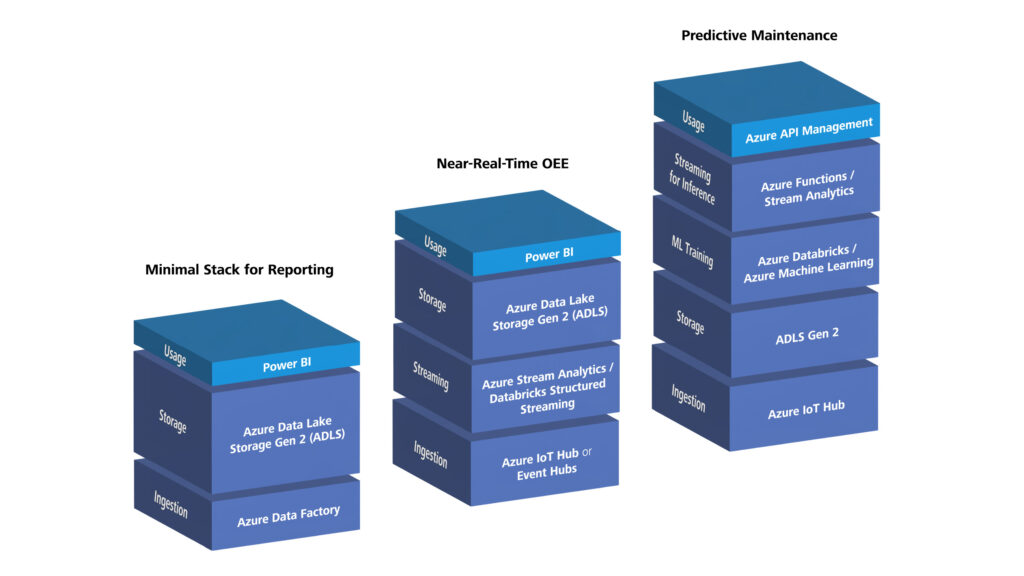
3D graphic comparing three Azure technology stacks for manufacturing: a minimal reporting stack with Azure Data Factory, Azure Data Lake Storage Gen2 and Power BI; a near‑real‑time OEE stack adding Azure IoT Hub or Event Hubs plus Azure Stream Analytics/Databricks Structured Streaming; and a predictive maintenance stack with Azure IoT Hub, ADLS Gen2, Azure Databricks/Azure Machine Learning, Azure Functions/Stream Analytics and Azure API Management for exposing predictions.
Figure 2: Examples of the technology stack for typical manufacturing use cases

Example 1: minimal stack for reporting

Requirements:

  • Daily KPI reports for one plant
  • Data sources: MES database (SQL), a few CSV exports
  • Users: management, controlling
  • Latency: daily update is sufficient

Azure stack:

  1. Ingestion: Azure Data Factory with SQL connector and Blob connector; for on-premises sources usually through Self-Hosted Integration Runtime
  2. Storage: ADLS Gen2
    1. Bronze: raw data from SQL and CSV
    1. Silver: cleaned data (e.g. normalized timestamps, duplicates removed), Apache Iceberg as the table format
    1. Gold: aggregated KPIs (e.g. produced parts per line, scrap per product)
  3. Transformation: Azure Data Factory with visually designed data transformations (mapping data flows) or simple copy activities
  4. Usage: Power BI reads directly from the Gold layer

Alternative with Microsoft Fabric: Data Factory loads the data into OneLake, a Lakehouse maps Bronze, Silver, and Gold, and Power BI accesses the same platform directly. This path is especially attractive when data integration, governance, and business intelligence should be tightly connected in one SaaS environment.

Note: This stack is almost turnkey. The main effort lies in data modeling, KPI definition, and governance (who may see which data?).

Example 2: near real-time OEE for multiple lines

Requirements:

  • Second- to minute-level view of machine condition and OEE
  • Multiple production lines, different machine types
  • Display in the control room on large monitors
  • Simple alerting in case of faults

Azure stack:

  1. Ingestion: Azure IoT Hub or Azure Event Hubs
    1. OPC UA gateway collects data from machines and sends it to Azure IoT Hub
  2. Edge (optional): Azure IoT Edge or Azure IoT Operations
    1. Azure IoT Edge for local preprocessing, filtering, and buffering during network outages
    1. Azure IoT Operations for standardized data flows on Azure Arc/Kubernetes
  3. Streaming: Azure Stream Analytics or Structured Streaming in Azure Databricks
    1. Calculates OEE almost in real time and writes to ADLS Gen2 (Bronze/Silver)
  4. Storage: ADLS Gen2 with Apache Iceberg for Silver/Gold
  5. Usage: Power BI with real-time streaming or custom dashboards (e.g. React app)

Alternative with Microsoft Fabric: Real-Time Intelligence handles ingestion, event streams, and real-time analysis, while OneLake and Eventhouse form the data foundation. Power BI or real-time dashboards visualize the results. This is especially interesting when streaming, analysis, and visualization should be combined in one platform.

Note: Azure provides streaming and visualization building blocks, but the edge architecture (filter logic, offline handling) and the OEE calculation logic are project-specific. OT must connect the machines, IT must operate the edge infrastructure, and the data team must develop the streaming logic.

Example 3: Predictive Maintenance with ML

Requirements:

  • Prediction of bearing failures based on vibration data
  • Historical data over 2 years needed for model training
  • Current streaming data for predictions
  • Predictions should flow into the CMMS

Azure stack:

  1. Ingestion: Azure IoT Hub for vibration sensors
  2. Speicher: ADLS Gen2 with Apache Iceberg
    1. Bronze: raw data (vibration, temperature, etc.)
    1. Silver: cleaned time series, feature engineering for ML
    1. Gold: aggregated features for ML training
  3. ML: Azure Databricks or Azure Machine Learning
    1. Model training with historical data (Silver/Gold)
    1. Model deployment as REST API (e.g. through Azure Machine Learning endpoints or Model Serving in Azure Databricks)
  4. Streaming for inference: Azure Functions or Azure Stream Analytics call the model API
  5. Integration: Azure API Management provides predictions for the CMMS
  6. Optional: Azure IoT Edge or Azure IoT Operations brings the model or preprocessing locally to the asset

Alternative with Microsoft Fabric: Microsoft Fabric combines OneLake, data engineering, data science, and Power BI in one platform. For streaming-related analyses, Real-Time Intelligence can capture the current data, while models are trained and evaluated on the historical data in OneLake. If predictions must be generated very close to the asset, the edge part remains a separate architecture decision.

Note: This is where the difference between platform building blocks and custom development becomes especially clear. Azure provides ML tools, APIs, and deployment mechanisms, but the model itself, the selection of suitable features, the concept for retraining the model, and the integration into the CMMS are pure project work. Close cooperation between data science experts, OT, and IT is essential here.

Interim conclusion: from use case to Azure stack

The three scenarios and the Azure toolbox make it clear: there is no universal answer to the question of which stack is the right one. The key is to think consistently from current and especially future use cases. Latency requirements, data volume, user groups, and organizational conditions determine which combination of ingestion, storage, processing, and visualization makes sense.

Microsoft provides two solid directions for this: the composed Azure PaaS path with services such as Azure IoT Hub, Azure Event Hubs, Azure Data Factory, ADLS Gen2, Azure Data Explorer, or Power BI, and the more integrated SaaS approach via Microsoft Fabric path with OneLake, Data Factory, Real-Time Intelligence, and Power BI in one platform. The stack examples presented show typical starting points, from minimal batch reporting to an ML-driven predictive maintenance setup.

But choosing the right technology stack is not enough. In the second part of this article, we will address questions that go beyond the mere use of tools: When do you need edge processing and when is the cloud sufficient? Where do managed services end, and where does the actual project work begin? How can governance, modern software development, and operations be designed to ensure the platform remains viable in the long term? And what mistakes should you avoid from the very start?
Industrial Data Platforms on Microsoft Azure: a decision guide for manufacturing – Part 2: From architecture to implementation and the most costly misunderstandings in practice

From the Azure stack to a viable architecture

In the first part of this article, we translated typical manufacturing scenarios, from KPI reporting through OEE monitoring to predictive maintenance, into specific Azure stacks. We structured Azure building blocks to task clusters and demonstrated how data ingestion, storage, processing, and use interact using three example stack combinations.

But a platform does not stand or fall based on tool selection alone. In this second part, we focus on deeper questions: when is edge processing necessary, and when is pure cloud i ngestion enough? Where do the capabilities already provided by Azure or Microsoft Fabric end, and where does project-specific development begin? Which development practices ensure long-term maintainability of the platform? And which decision-making patterns repeatedly lead to unnecessary complexity or avoidable costs?

Edge vs. cloud: the central architecture question

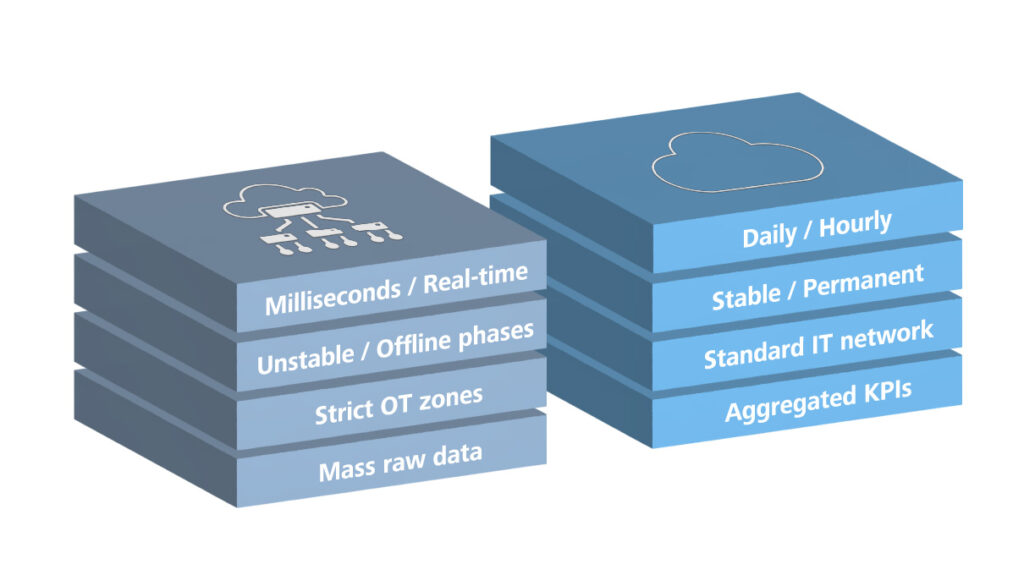
When is pure cloud ingestion enough, and when do we need edge? The answer depends on latency, network stability, and OT security zones. With daily reports, stable network connectivity, and IT-side data sources, you can go directly to the cloud. But with strict latency requirements, unstable internet connections, strict OT security zones, or high data volume, edge is the better choice. Real control loops in the millisecond range remain the responsibility of the automation layer; here the data platform mainly supports monitoring, analysis, and coordination. In our work with manufacturing companies, we see this decision regularly: it is rarely purely technical, but also touches security policies, operating concepts, and organizational boundaries.

For edge implementation, there are currently two comparable approaches in the Microsoft ecosystem, with different strengths. Azure IoT Edge is especially suitable when containerized logic should run on individual devices or gateways, for example for local preprocessing, filtering, inference, or offline buffering. Azure IoT Operations is stronger when you want to build a standardized industrial edge data layer with MQTT broker, OPC UA connectivity, and data flows to targets such as Azure Event Hubs, Azure Data Lake Storage (ADLS) Gen2, Microsoft Fabric OneLake, or Azure Data Explorer on Azure Arc and Kubernetes. What Microsoft does not take off your hands in either case is the choice of protocols, the filtering logic, the failover behavior, and the OT integration. OT, IT, and the data team need to work together here: OT defines latency and security requirements, IT operates the edge infrastructure, and the data team develops the processing logic.

3D graphic comparing edge and cloud scenarios for industrial data: on the left, stacked blocks labeled “Milliseconds / Real-time”, “Unstable / Offline phases”, “Strict OT zones” and “Mass raw data”; on the right, blocks labeled “Daily / Hourly”, “Stable / Permanent”, “Standard IT network” and “Aggregated KPIs”, illustrating when edge versus cloud processing is appropriate.
Figure 1: Comparison of key parameters of edge and cloud architectures

Where Azure is turnkey and where project work begins

Azure is not a turnkey “Industry 4.0 product”, but a powerful ecosystem of building blocks. In the PaaS approach, Microsoft provides strong infrastructure support: Azure IoT Hub manages the device lifecycle, Azure Data Factory includes hundreds of standard connectors, ADLS Gen2 and open table formats such as Apache Iceberg or Delta Lake provide a solid Lakehouse foundation, Azure Data Explorer supports interactive time-series and telemetry analysis, Power BI integrates smoothly, and Azure Monitor monitors everything centrally. In the more integrated SaaS approach via Microsoft Fabric, OneLake provides the shared storage base, Data Factory handles data integration, Lakehouse handles processing, and Power BI handles usage within the same platform.

However, OT-specific connectors often require partners or custom development. Semantics are pure project work: what does “machine condition” mean? Which tags are needed? Which units apply? You develop the Bronze/Silver/Gold design, data contracts, data quality checks, and domain-specific applications yourself. Microsoft handles the infrastructure work, but domain architecture, data modeling, and governance remain your responsibility.

Modern software development: not optional, but mandatory

An often underestimated point is this: an industrial data platform is software and must be treated as such. Without modern development practices, it quickly becomes difficult to manage. At ZEISS Digital Innovation, we deliberately combine software engineering practices with the world of industrial data, not as an end in itself, but to keep projects maintainable and scalable in the long term.

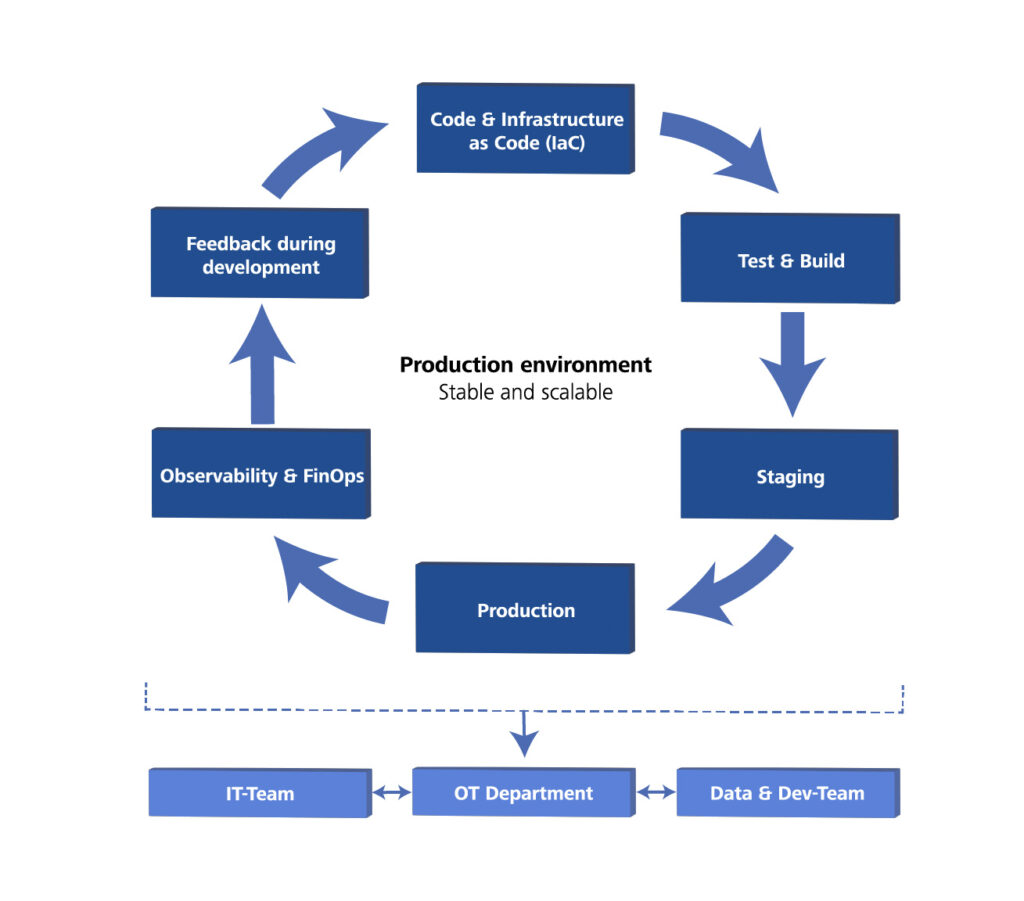
Diagram of a DevOps lifecycle for an industrial data platform: circular flow from “Code & Infrastructure as Code (IaC)” to “Test & Build”, “Staging”, “Production”, “Observability & FinOps” and “Feedback during development” around a “Production environment – stable and scalable”, with IT team, OT department, and Data & Dev team shown collaborating underneath.
Figure 2: Principles of Modern Software Development

The foundation for this is the automation of infrastructure and deployments. Instead of manually clicking Azure resources together, the entire environment is described as Infrastructure as Code (IaC) (for example with Bicep or Terraform). This allows even complex setups for several plants to be rolled out consistently and under version control. Closely linked to this is Continuous Integration and Continuous Delivery (CI/CD) for data pipelines: Azure Data Factory pipelines or Azure Databricks Notebooks are treated like classic code, go through automated unit and integration tests with realistic test data, and move through clean staging environments into production. Faulty versions can then be reverted within minutes, before they cause unnoticed problems.

Once the platform is live, observability closes the loop, both technically and economically. Tools such as Azure Monitor and Azure Log Analytics do not just monitor whether pipelines run without errors and latencies stay within limits, but also continuously check data quality. Proactive alerts report problems before users notice them. Closely related to this is cost monitoring: Azure Cost Management does not only track spending at a high level, but also breaks it down by use case, plant, or business area with the help of cost allocation tags. Only this transparency allows sound decisions about which use case is economically sensible and where optimization is worthwhile. Cost awareness thus becomes an integral part of platform governance.

The roles are clearly divided: IT is responsible for landing zones, IaC, and the CI/CD setup. Data and development teams build pipelines and ML models, while OT provides the requirements and tests in the staging environment. Only this interaction creates a reliably maintainable platform.

Data governance: not a later add-on

Data governance deserves its own article, but the core message is clear: governance must be built in from the start. It is about data ownership (who is responsible?), data quality (which standards apply?), access control (who may see what?), and compliance (GDPR, audit requirements).

Azure supports this with Microsoft Purview for data catalogs and lineage, Azure RBAC (Role-Based Access Control) and Microsoft Entra ID for fine-grained access control, landing zones for clear domain ownership, and Azure Policy for enforced standards. Governance is especially critical in industrial data: production data may be regulated (pharma, automotive), OT data must not fall into the wrong hands, and without trust in data quality nobody will use the platform. Azure and Microsoft Fabric provide the tools, but you must define the governance strategy, roles, processes, and standards yourself.

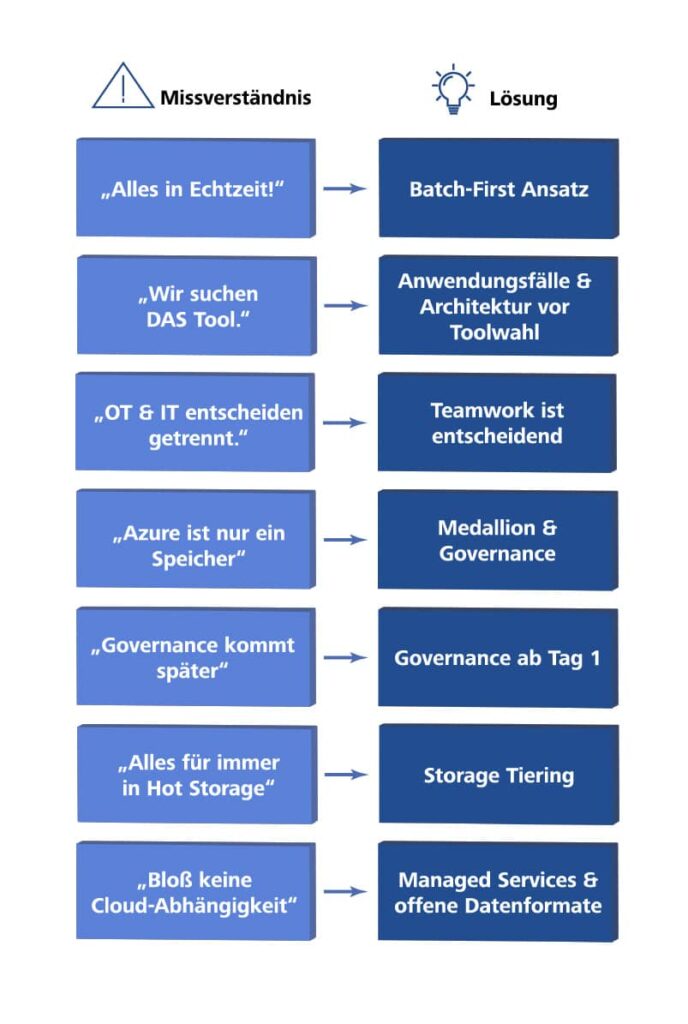
Common mistakes – and what we can learn from them

In our work with customers, we keep seeing similar challenges. Knowing them and addressing them early is part of our role as a partner.

Infographic listing common misconceptions about industrial data platforms on Azure on the left—such as “We do everything in real time”, “We’re looking for THAT tool”, “OT and IT decide separately”, “Azure is only storage”, “Governance comes later”, “All data stays in hot storage forever” and “We don’t want cloud dependency”—and the corresponding solutions on the right: “Batch-first approach”, “Use cases & architecture before choosing a tool”, “Teamwork is crucial”, “Medallion & governance”, “Governance from day 1”, “Storage tiering” and “Managed services & open data formats”.
Abbildung 3: Mythen in der Entscheidungsfindung

We do everything in real time” is a classic. Every dashboard is supposed to update immediately, even when daily updates would be fully sufficient. The result: unnecessary complexity, higher costs, longer development time. The key question is: Which decisions are really made in real time? Often, a minimum viable product (MVP) with batch processing is the better start.

“We are looking for the one Azure product that solves everything” reveals a misunderstanding. There is no single “product”, but an ecosystem of building blocks. A platform is created through architecture, not through tool selection. Define use cases and architecture first, then choose the suitable building blocks.

“OT and IT decide separately” leads to isolated solutions. OT procures edge gateways, IT builds the cloud platform, and the data team hears nothing about it until the systems are incompatible. Industrial data processing is teamwork. Joint kickoffs, a shared architecture vision, and clear end-to-end responsibility are essential.

“Azure is only storage” is the safe road to a data swamp. If data lands in ADLS Gen2 “somehow” without structure, transformation, or governance, nobody will find anything later. The Medallion structure, data quality checks, and a catalog, for example with Microsoft Purview, are not extras, but basic requirements.

“Governance comes later” is an illusion. Governance added later is much harder than governance from the start. Define basic roles, access controls, and naming conventions from day one.

“All data stays in hot storage forever” is a classic cost trap. ADLS Gen2 offers different storage tiers, Hot, Cool, and Archive, with clearly different cost structures. If all historical data stays permanently in the Hot tier, storage costs become unnecessarily high. Define from the start: Which data needs fast access, which is rarely used, and which is only for long-term archiving? Azure Lifecycle Management automates this tiering. The same applies to data resolution: not every historical time series needs to be stored at full resolution. Downsampling older data saves storage volume and therefore cost.

“We don’t want cloud dependency” sounds cautious but often leads to expensive extra effort. If you only use VMs and open-source components, you give up managed services and must operate everything yourself: patching, scaling, and monitoring. The better question is: Can we keep data in standard formats and still benefit from managed services?

Conclusion: from architecture to implementation

An industrial data platform on Azure does not mean buying a product, but designing and implementing an architecture. Microsoft offers a mature ecosystem of building blocks that removes much of the infrastructure and platform work. The challenge is to choose the right building blocks, combine them sensibly, and create sustainable governance.

The most important principles are these: Start from the use case, not from the technology. Think in task clusters, not in product lists. A PaaS approach using individual Azure services and an integrated SaaS approach using Microsoft Fabric are two valid options with different strengths. Edge versus cloud is an architecture decision, not a tool question. Microsoft provides the infrastructure, not the business logic. Domain model, transformations, and governance remain your responsibility. Modern software development with IaC, CI/CD, and tests is mandatory, not optional. And above all, OT, IT, and the data team must work together. Industrial data is a shared task.

This is exactly where we at ZEISS Digital Innovation come in: as a partner that understands both the manufacturing world and modern cloud architectures. We translate between OT, IT, and data, ask the right questions, create clear architectures, and work with our customers to develop solutions that work in practice and remain maintainable in the long term. From requirements through implementation to operations, we support you on the path to a scalable, future-ready data platform.

Data ingestion as the basic building block of an industrial data platform – Part 1

In today’s digital world, the ability to manage data efficiently and effectively is critical to the success of any industrial data platform. A key part of this process is data ingestion. But what exactly does data ingestion mean? Simply put, it is the process of collecting data from multiple sources, transferring it to a central data platform, and storing it there for further processing and analysis. Data ingestion plays a particularly important role in the manufacturing industry, where large amounts of data from different sources often have to be combined. Such data may include, for example, information on production processes, machine states, supply chains and quality controls. By analyzing this data, companies gain valuable insights into production bottlenecks, machine performance, and product quality, resulting in optimizations in production process efficiency and cost reduction.  

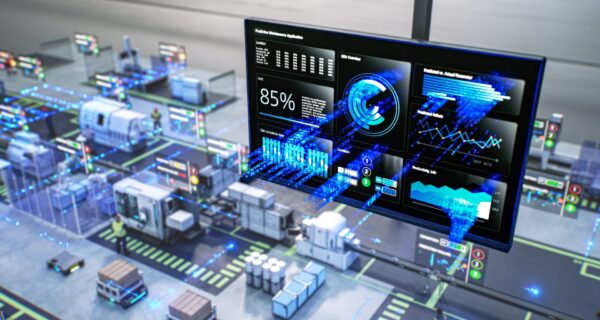
Figure 1: Transparent production processes through modern dashboards with real-time data

An industrial data platform is made up of several components, with the storage of the data having a decisive function. The architecture of such a platform should be designed to enable efficient recording, storage and processing of data. This is particularly important to ensure platform performance and scalability. 

The manufacturing industry faces specific challenges when it comes to data acquisition. On the one hand, data volumes are often very high, since machines and sensors continuously generate data. On the other hand, data comes from different sources and in different formats, making integration difficult. In addition, there are real-time requirements, since many manufacturing applications require immediate processing of data to optimize production processes or avoid downtime. 

The goal of this article is to provide a comprehensive overview of the topic of data ingestion in industrial data platforms. In the first part, we will explain different methods and techniques of data acquisition and discuss concepts of data storage, pointing out the advantages and disadvantages of the various approaches. In the second part, we discuss common challenges and present possible solutions. We attach particular importance to explaining the concepts in an easy-to-understand manner and to illustrating them with concrete examples of application. 

Types of data sources in the manufacturing industry 

In the manufacturing industry, there are a variety of data sources that are used for optimizing and monitoring production processes. The most important are: 

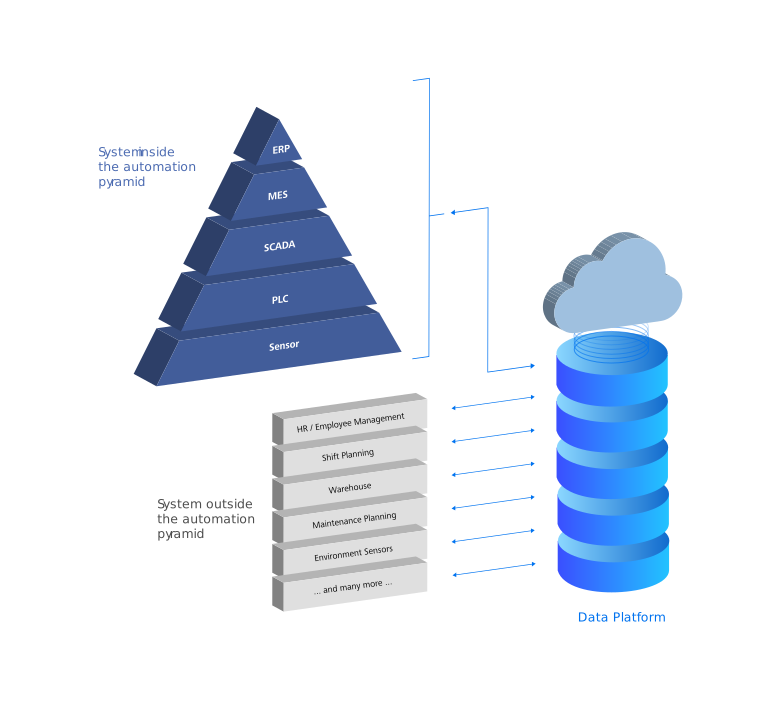
  1. Sensor and machine data: Machines and production plants are often equipped with sensors that continuously collect data on temperature, pressure, vibrations and other operating parameters. In addition, the machines themselves also generate important data, such as operating states and error messages. Both the sensor data and the machine-specific data are crucial for predictive maintenance and the optimization of the machine power. Since in many cases the sensor data is not directly accessible, access is often realized via the machine level, for example via a programmable logic controller (PLC).
  2. Supervisory Control and Data Acquisition (SCADA) systems: SCADA systems monitor and control industrial processes at a higher level. They collect data from various sensors and control units and enable remote monitoring and control of production plants.
  3. MES Systems (Manufacturing Execution Systems): MES systems monitor and control production processes in real time. They collect data on production orders, machine utilization and production quality.
  4. Enterprise Resource Planning (ERP) systems: ERP systems manage business processes such as procurement, production, sales and human resources. They provide valuable data on material flows, production plans and inventory management. 
  5. Quality control systems: These systems collect data on the quality of the goods produced. They help to identify quality problems at an early stage and to take measures to improve product quality.
  6. External data sources: Environmental and weather data can also play an important role, especially in sectors heavily influenced by external conditions. This data can be used to adapt production processes to changing environmental conditions. 

Data formats 

Data sources used in the manufacturing industry provide data in various formats. Some of the most common formats include: 

  • CSV (Comma-Separated Values): A simple text format commonly used for tabular data. CSV is easy to create and process with Microsoft Excel.
  • XML (Extensible Markup Language): A widely used data format in industrial machine integration, supplemented by XML Schema Definition (XSD) to precisely define the structure and assess the validity of the data. While newer formats such as JSON are gaining in importance, XML remains an important part of many industrial applications because of its robustness and compatibility with existing infrastructure.
  • JSON (JavaScript Object Notation): A widely used format for structured data that can be easily read by machines and humans.
  • OPC UA (Open Platform Communications Unified Architecture): A platform-independent communication protocol designed specifically for industrial automation. Standardized semantic data models in the form of companion specifications are particularly useful here.
  • Images: In the manufacturing industry image data is often used, for example from cameras for quality control or for monitoring production processes. This image data can provide valuable information that helps optimize production processes.
  • Documents: These include formats such as PDF, which often contain technical specifications, manuals or reports. PDF documents can also embed XML data containing structured information to facilitate data analysis.
  • Proprietary formats: Many machines and systems use vendor-specific data formats, which are often tailored specifically to the requirements of the respective application. 

Data volume and speed 

In the manufacturing industry, large amounts of data are generated at different frequencies and speeds. Typically, sensor data can be collected in real time or at very short intervals (milliseconds to seconds), resulting in a high data volume. ERP and MES systems normally provide data at longer intervals (minutes to hours), while quality control systems can vary depending on the production cycle. 

The speed at which this data is transmitted to the central data platform depends on the type of data source and the specific requirements of the application. Real-time data often needs to be processed immediately, while other data can be collected and transferred at regular intervals. 

For more information on typical use cases by latency, see the white paper Industrial Data Platform.

Data access options 

There are several technical ways to access data sources in the manufacturing industry: 

  • Log files: In a production plant, machines log error events and operating times in log files. These log files can be read regularly to monitor the condition of the machines and analyze errors.
  • File Access: A manufacturing company can store sensor data from production lines in CSV files. These files are then stored in a central network store where they can be retrieved and analyzed by data analysts to identify production patterns. Other applications for file access are image data or quality assurance check reports.
  • SQL (Structured Query Language): A production database can contain information about inventories, production schedules, and supply chains. Engineers and data analysts can use SQL queries to selectively retrieve data and generate specific reports from it, for example.
  • CDC (Change Data Capture): This technique captures changes in databases as they arise and transmits them to the central data platform. This is of particular interest for applications in which changes are to be reacted very quickly (in quasi-real time). This allows close monitoring of process parameters and the timely initiation of countermeasures in the event of detected deviations.
  • API (Application Programming Interface): Many systems provide APIs that can be used to retrieve data programmatically. One area of application is the integration of a production planning system with an ERP system in order to synchronize production plans and material requirements automatically.
  • Messaging: In a networked manufacturing environment, an MQTT-based system can be used to send sensor data from different machines to a central control unit. This enables real-time monitoring and control of production processes, which is particularly important in Industry 4.0 applications. Apache Kafka as a data stream storage and processing solution can be used to process and analyze large amounts of data from IoT devices. It can thus be used to optimize production processes.
  • Best Practices: To minimize the burden on the primary data source, it may be useful to use Read Replicas. These copies of the database can be used for read access without affecting the performance of the main database.

By combining these different data sources, formats, and access options, an industrial data platform can provide valuable insights into production processes and help optimize the overall manufacturing process. 

Data storage in the platform: The concept of a data lakehouse 

In today’s data architecture, the Data Lakehouse concept has emerged as a promising solution that combines the advantages of Data Lakes and Data Warehouse. A data lakehouse allows large amounts of structured and unstructured data to be stored and processed in a unified system, making it easier for companies to gain valuable insights from their data. 

Data storage formats

A key feature of Data Lakehouse is the use of efficient storage formats that enable quick retrieval and analysis of data. Some of the most common formats include: 

  • Parquet: A column-based storage format optimized for storing large amounts of data. Parquet enables efficient data compression and encoding, reducing storage costs and increasing query speed.
  • Delta Lake: An open-source storage solution built on the Apache Parquet format that supports ACID transactions. Delta Lake enables you to store data in a data lake while taking advantage of a data warehouse by providing structured query and data integrity.
  • Apache Iceberg: Another open-source project that provides a flexible and powerful solution for managing large amounts of data in Data Lakehouses. Iceberg supports complex data queries and enables easy management of data versions. 

Comparing Data Warehouse and Data Lakehouse 

Data warehouses are designed to store structured data in fixed schemas and provide powerful query capabilities for business intelligence and reporting. They are ideal for organizations that need consistent, structured data to produce historical analyses and reports. However, they can be expensive and less flexible when it comes to storing and processing unstructured data. 

Data lakehouses, on the other hand, utilize cost-effective object storage services such as Amazon S3 or Azure Blob Storage. This feature is borrowed from data lakes, but the aforementioned storage formats also allow structured data to be stored in them. Such storage solutions offer virtually unlimited scalability and flexibility, making it possible to store large amounts of data without having to worry about infrastructure. Using object storage not only reduces data storage costs but also enables the integration of data from various sources and its processing with modern analytics tools, which is particularly beneficial for data-intensive applications such as machine learning and real-time analytics. Data lakehouses add a layer of structure and performance optimization on top of the data lake, creating a hybrid architecture that combines the strengths of both data lakes and data warehouses. 

Unlike traditional data warehouses, data storage and processing can be scaled independently of each other in a Data Lakehouse. Especially by providing compute capacity in a timely and on-demand manner, the benefits of the cloud can be used effectively. Very large amounts of data can thus be processed in a shorter time. Conversely, the uncomplicated release of these resources leads to cost savings in times of reduced demand. 

Bronze stage of medallion architecture 

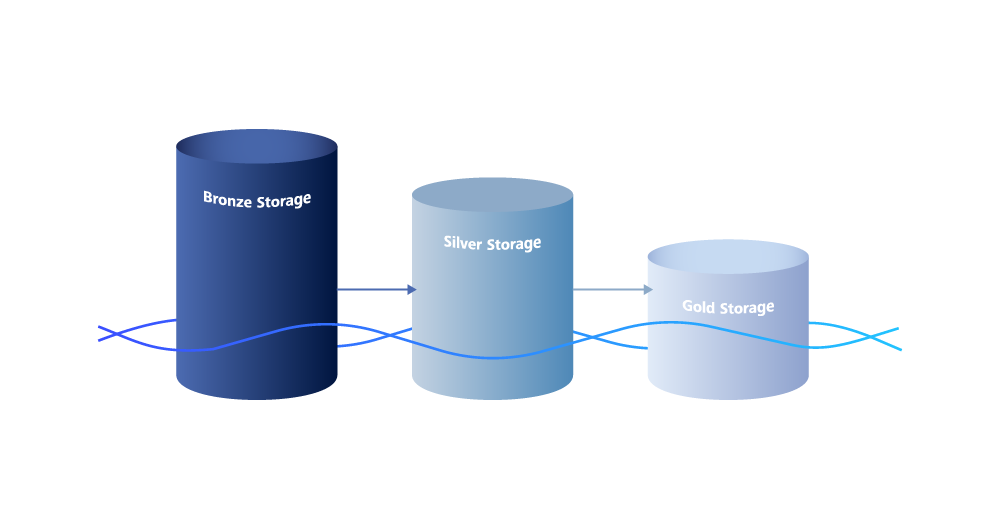
The medallion architecture in data platforms is an approach where data is organized in multiple layers to gradually improve its quality and usability. These layers include the bronze layer for raw data, the silver layer for adjusted data that corrects or removes erroneous, incomplete, or inconsistent data, and the gold layer for enriched data that has been further refined by adding additional information or by aggregation. This enables structured and efficient data processing. 

An important aspect of data storage in a Data Lakehouse is the Bronze Stage of the Medaillion architecture. In this phase, the first recording of data from different sources is carried out (see Types of data sources). The data is stored in its raw format, which means that it has not yet been cleaned up or transformed. This Bronze Stage serves as a central repository for all incoming data and enables companies to preserve a complete history of their data. 

The Bronze Stage is crucial for data ingestion, as it forms the basis for the subsequent stages (silver and gold) in which the data is further processed, enriched and optimized for analysis. By storing data in the bronze level, companies can access the original data at any time. This is particularly important for audits as it ensures transparency and traceability. For data analysis, access to raw data provides the flexibility to test new analysis methods or validate existing analyses by using the original data. 

Conclusion 

Data ingestion is a key component of industrial data platforms that enables data from multiple sources to be efficiently collected and stored for analysis. This is particularly important in the manufacturing industry, as large amounts of data must be processed in real time to optimize production processes. And storing data in a data lakehouse using efficient formats such as Parquet, Delta Lake, or Apache Iceberg in low-cost cloud object storage services offers numerous benefits. By implementing a medallion architecture with a clear bronze stage for data ingestion, companies can ensure that they build a robust and flexible data infrastructure that helps them gain valuable insight from their data and optimize their production processes. 

Crucial for success is that the implementation of a data platform aligns with a company’s needs. After all, the value of an industrial data platform is not found in the data or platform itself, but in the use cases build on the platform and its data. These use cases are the best indication of which steps to start with when building such a platform. It is therefore advisable to prioritize these, e.g. based on a rapid return on investment (ROI) or quick wins. It is not necessary to implement all elements of the data platform right from the start, but to allow this infrastructure to grow in a sensible order. 

This post was written by:

Christian Heinemann

Christian Heinemann is a graduate computer scientist and works as a solution architect at ZEISS Digital Innovation in Leipzig. His work focuses on the areas of distributed systems, cloud technologies and digitalization in manufacturing. Christian has more than 20 years of project experience in software development. He works together with various ZEISS units and external customers to develop and implement innovative solutions.